Firstly, thanks to all the version 1 users for supporting Easy Password Manager
and making it the success it has become. To find out what is new in V2 click
here.
Warning: Make sure you close EPM V1 before proceeding with the import.
How to import V1 databases into V2.
On
the EPM Login screen, press the "Manage Backups" button. This will
open the Import and Backup Window.
At this point you need to establish the location of your Version 1 Databases
folder on your hard drive.
a) The databases folder is located in the "Easy Password Manager",
program folder. If you installed EPM Version 1 with the default options,
this should be located in:
If you cannot find it there and do not know where it is, use the "Find"
utility of Windows to locate the "Easy Password Manager" folder.
Refer to Windows Documentation / Help on how to do this.
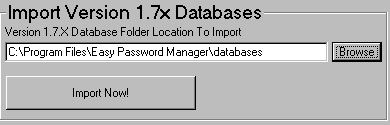
Once you know the full path to the databases folder, enter this into the
relevant text box on the page. Alternatively you can press the Browse button
to navigate to the folder.
Remember: You need to have the complete path to the databases directory,
including the databases folder itself.
Once you have the correct path in the text box, just press the "Import
Now" button and then confirm your actions on the dialog that pop ups
up. Note that your original databases folder is left unchanged. EPM only reads
the V1 data.
Important Note:As there are more fields on the V2 form filler after
you have imported your data you will need to manually adjust the records so
that the fields are suitability filled. For example, if you had "Billy
Jean" as your "Full Name" in V1, as there is both a First and
Last name in V2, after importing, the First name field will contain "Billy
Jean" and the Last name field will be empty.
 On
the EPM Login screen, press the "Manage Backups" button. This will
open the Import and Backup Window.
On
the EPM Login screen, press the "Manage Backups" button. This will
open the Import and Backup Window.